How to bridge from child chain to parent chain
This guide explains how to programmatically send messages and withdraw assets from an Arbitrum child chain back to a parent chain (like Ethereum). For conceptual information about the messaging protocol, see Child to parent chain messaging.
Prerequisites
- A child chain wallet with funds
- Access to parent chain infrastructure (for executing the final step)
- Awareness that child-to-parent messages require ~7 days to finalize
Overview of the process
Child-to-parent chain messaging follows these steps:
- Send message on child chain: Call
ArbSys.sendTxToL1to initiate the message - Wait for finalization: The message enters a ~7 day challenge period
- Execute on parent chain: After finalization, call
Outbox.executeTransactionto complete the transfer
Sending a message from child to parent chain
To send a message from the child chain to the parent chain, use the ArbSys precompile's sendTxToL1 method:
function sendTxToL1(
    address destination,
    bytes calldata data
) external payable returns (uint256)
Parameters
destination: The parent chain address that will receive the messagedata: Calldata to send to the destination address on the parent chain
Return value
Returns a unique identifier for the message, which can be used to track the message status and construct the outbox proof for execution.
The ArbSys precompile is located at address 0x0000000000000000000000000000000000000064.
Example: Sending a simple message
const arbSys = new ethers.Contract(
  '0x0000000000000000000000000000000000000064',
  arbSysABI,
  childChainSigner,
);

const tx = await arbSys.sendTxToL1(
  parentChainDestination,
  ethers.utils.toUtf8Bytes('Hello from L2!'),
);
const receipt = await tx.wait();
Executing the message on the parent chain
After the ~7 day challenge period, you can execute the message on the parent chain.
Step 1: Retrieve proof data
Use the NodeInterface contract to get the Merkle proof:
function constructOutboxProof(
    uint64 size,
    uint64 leaf
) external view returns (
    bytes32[] memory proof,
    uint256 path,
    address l2Sender,
    address l1Dest,
    uint256 l2Block,
    uint256 l1Block,
    uint256 timestamp,
    uint256 amount,
    bytes memory calldataForL1
)
Parameters:
size: The batch number containing your messageleaf: The index of your message within the batch (0-indexed)
Example usage:
const nodeInterface = new ethers.Contract(
  '0x00000000000000000000000000000000000000C8',
  nodeInterfaceABI,
  childChainProvider,
);

const proofData = await nodeInterface.constructOutboxProof(batchNumber, indexInBatch);
NodeInterface is a "virtual" contract accessible at 0x00000000000000000000000000000000000000C8. It's not a true precompile but provides Arbitrum-specific data without requiring a custom RPC.
Step 2: Execute on the parent chain
Call Outbox.executeTransaction with the proof data from step 1:
function executeTransaction(
    bytes32[] calldata proof,
    uint256 path,
    address l2Sender,
    address l1Dest,
    uint256 l2Block,
    uint256 l1Block,
    uint256 timestamp,
    uint256 amount,
    bytes calldata calldataForL1
) external
All parameters come from the constructOutboxProof call. The method will execute the message at the l1Dest address with the provided calldata and amount.
Example usage:
const outbox = new ethers.Contract(outboxAddress, outboxABI, parentChainSigner);

const tx = await outbox.executeTransaction(
  proofData.proof,
  proofData.path,
  proofData.l2Sender,
  proofData.l1Dest,
  proofData.l2Block,
  proofData.l1Block,
  proofData.timestamp,
  proofData.amount,
  proofData.calldataForL1,
);
await tx.wait();
Withdrawing ETH
To withdraw ETH from the child chain, use the ArbSys precompile's withdrawEth method:
function withdrawEth(
    address destination
) external payable returns (uint256)
Parameters
destination: The parent chain address that will receive the ETH- Value (msg.value): The amount of ETH to withdraw from the child chain
Return value
Returns a unique identifier for the withdrawal message.
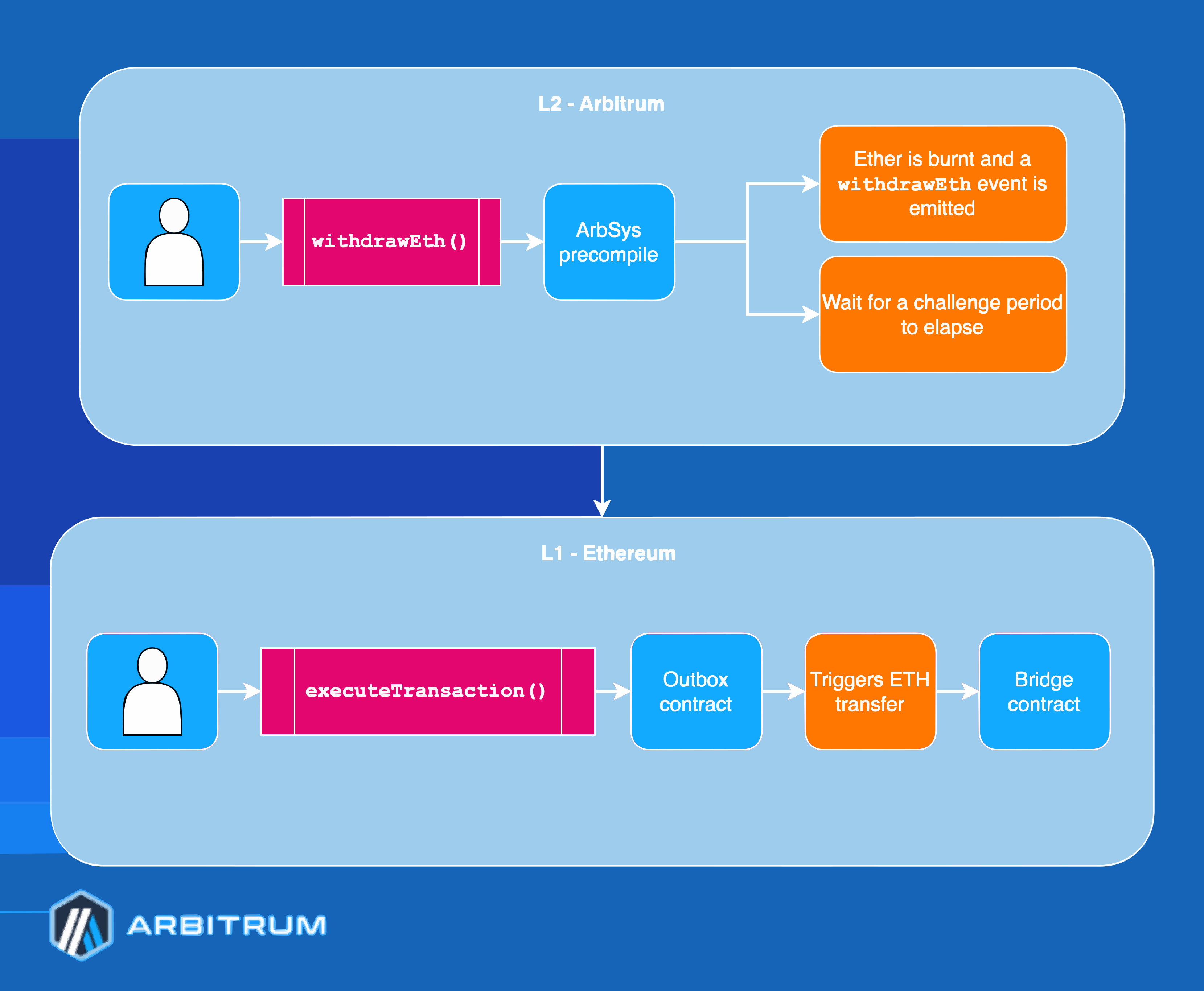
How ETH withdrawal works
- On the child chain: The ETH balance is burned and a message is created
- Challenge period: Wait ~7 days for the assertion to finalize
- On the parent chain: Execute via
Outbox.executeTransactionto claim your ETH
ArbSys.withdrawEth is equivalent to calling ArbSys.sendTxToL1 with empty calldata. Like any child-to-parent message, it requires executing on the parent chain after the dispute period.
Example: Withdrawing ETH
const arbSys = new ethers.Contract(
  '0x0000000000000000000000000000000000000064',
  arbSysABI,
  childChainSigner,
);

// Withdraw 0.1 ETH
const tx = await arbSys.withdrawEth(parentChainAddress, {
  value: ethers.utils.parseEther('0.1'),
});
const receipt = await tx.wait();

// After 7 days, execute on parent chain using the steps above
The withdrawal process:
Withdrawing ERC-20 tokens
For ERC-20 token withdrawals, see the dedicated Withdraw tokens guide, which provides detailed instructions for using Arbitrum's canonical token bridge.
Using the Arbitrum SDK
The Arbitrum SDK simplifies child-to-parent messaging:
import { L2ToL1MessageStatus, L2TransactionReceipt } from '@arbitrum/sdk';

// Get the L2 transaction receipt
const l2Receipt = await childChainProvider.getTransactionReceipt(l2TxHash);
const l2TxReceipt = new L2TransactionReceipt(l2Receipt);

// Get L2ToL1 messages from the transaction
const messages = await l2TxReceipt.getL2ToL1Messages(parentChainSigner);

// Wait for the message to be executable
const message = messages[0];
await message.waitUntilReadyToExecute(childChainProvider);

// Execute the message on the parent chain
const executeResult = await message.execute(childChainProvider);
await executeResult.wait();
Message lifecycle
Child-to-parent messages go through these stages:
| Stage | Description |
|---|---|
| Posted on child chain | The message is sent via ArbSys.sendTxToL1 |
| Waiting for finalization | The assertion containing the message is in the challenge period (~6.4 days) |
| Confirmed and executable on parent chain | The assertion is confirmed, and the message can be executed in the outbox |
Next steps
- For protocol-level details, see Child to parent chain messaging
- For token bridging concepts, see Token bridging overview
- For the Arbitrum SDK documentation, see SDK reference